Note: Access to the Business Profile depends on your plan. Some plans do not include the AI Tools, and an upgrade may be needed to use this feature.
Before you start
- You must be signed in with permissions to edit the Business Profile.
- Have your business information ready: business name, website URL, short product/service summary, and contact name/personality notes.
Step-by-step Guide
1. Open the Business Profile
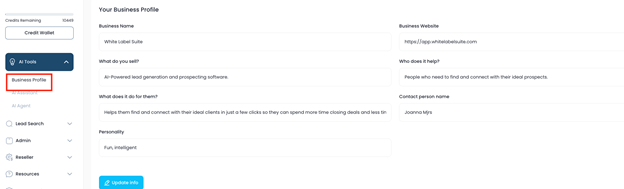
From the left-hand navigation, click AI Tools to expand the menu.
- Click Business Profile.
2. Create or update your Business Profile
- Fill out the required fields:
- Business Name — the official name of the business.
- Website — enter the full URL. Important: the field requires the https:// prefix (e.g., ExampleExample Domain).
- What you sell / who it helps / benefit — a short, concise description of the product or service and who it serves. Shorter, clearer descriptions work best.
- Contact name & personality — a brief note about the preferred tone/personality for the AI agent (example: "Friendly, concise, professional").
Tip: Keep the copy short and focused — the AI agent performs better with concise inputs.
3. Access help if you get stuck
- If you need assistance, open the support panel on the left-hand side of the screen.
- Use Ask a question or Search for help to contact our support team.
Reminder: Our support team is available to help through every step
Best practices
- Use short, clear descriptions for business profile fields.
- Only include pages the AI should reference (avoid internal or admin pages).
- Re-crawl after major site updates.
FAQ
Q: Do I have to include https:// in the website field?
A: Yes — the field requires https:// in the URL to validate the website.
Was this article helpful?
That’s Great!
Thank you for your feedback
Sorry! We couldn't be helpful
Thank you for your feedback
Feedback sent
We appreciate your effort and will try to fix the article